Let’s be honest: we’ve all been there. You buy a sick AK-47 skin on the Steam Market, get excited to use it in-game, and then you realize... the previous owner slapped four ugly, mismatched stickers on it. Or maybe you applied a sticker five years ago that you now regret. The question immediately pops up: can you remove stickers in CS2 without ruining the weapon?
.jpg)
The short answer is yes. But unlike other games where you just hit "delete," Counter-Strike 2 has a unique mechanic called "scraping." In this guide to sticker removal, I’m going to walk you through how to safely clean up your weapon skins, explain the difference between scraping and removing, and give you some pro tips on how to handle your inventory.
Article Contents:
Can You Remove Stickers in CS2? The Short Answer
Yes, you absolutely can. Valve kept the core mechanics from CS:GO, so if you want to remove a sticker, you have the freedom to do so. However, it’s not as simple as an "undo" button.
In CS2, the process is destructive. You don't get the sticker back into your inventory. Once you decide to remove sticker from a gun, it is gone forever. This is critical to understand before you start clicking away, especially if you have expensive stickers (like a Katowice 2014) on a cheap skin..jpg)
How to Remove Stickers in CS2: Step-by-Step Guide
If you are ready to say goodbye to that sticker, here is exactly how to do it. The interface in Counter-Strike 2 is slightly cleaner than Global Offensive, but the buttons are in similar spots.
Here is the step-by-step process to learn how to remove them:
- Open CS2 and go to your Inventory.
- Find the weapon or skin that has the applied stickers you want to remove.
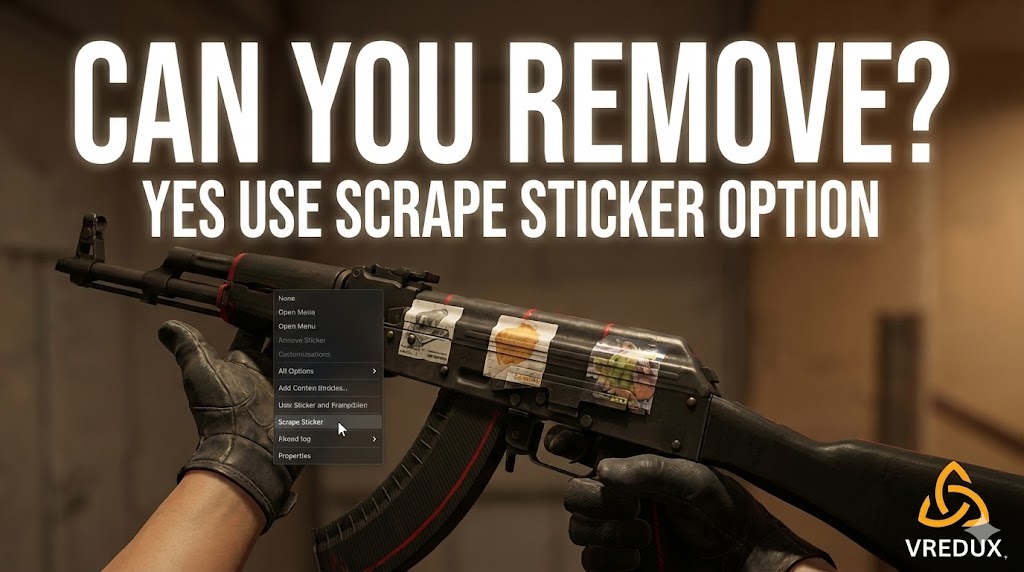
- Right-click on the weapon and select "Scrape Sticker".
- A menu will pop up showing the gun and the sticker slots at the bottom.
- Click on the specific sticker you want to remove.
- Press the "Scrape Sticker" button.
Important Tip: The game will ask for confirmation. Each time you click "Scrape," the sticker gets a little more worn. To remove stickers in CS2 completely, you usually need to scrape it about 7–10 times until it vanishes entirely.
If you want to learn more about customizing your game, check out our guide to CS2 binds to improve your movement, or read about how to optimize your FPS to make your game run as smooth as your new skins look..jpg)
Scrape vs. Remove: What’s the Difference?
This is where the strategy of sticker crafting comes in. You don't always have to remove the sticker entirely.
When you scrape stickers, you are essentially adding "wear" to them.
- 1-5 Scrapes: The sticker looks scratched, damaged, and vintage.
- 6-9 Scrapes: Only the outline or specific parts of the sticker remain.
- 10+ Scrapes: The sticker is removed permanently.
Many pro players and skin enthusiasts intentionally scrape stickers to reveal hidden "Easter eggs" or signatures. For example, some player autograph stickers reveal just the signature without the background when you scrape them enough. It’s a great way to customize and personalize your CS2 skins.
Does scraping damage the skin?
I see this question a lot. Beginners often worry that if they scrape the sticker, they might scratch the paint of the weapon itself.
Don’t worry. Scraping only affects the sticker. Your weapon skins (the actual gun paint) will take zero damage. You can scrape off a sticker, apply a new sticker, and scrape it off again a thousand times—the gun will look exactly the same..jpg)
Managing Your Stickers in CS2
With the new update in Counter-Strike 2, Valve changed the game. You can now place stickers anywhere on the gun. This precise placement means you might need to remove old stickers to make room for a new, custom craft.
Can I remove multiple stickers at once?
No, you have to do it one by one. If you bought a skin with four stickers, you will need to select each one individually in the menu and scrape it down until it's gone. It takes a minute, but it ensures you don't accidentally remove a sticker you wanted to keep.
Removing "Trade Locked" Stickers
If you just bought a skin, the item might be trade-locked for 7 days, but you can still modify it. You can apply stickers or remove them immediately. The trade lock only stops you from trading the item to another player, not from customizing it.
Quick Comparison: CS2 Sticker Actions
To make it clear, here is a breakdown of what you can and can't do with CS2 sticker mechanics:
| Action | Result | Can you undo it? |
|---|---|---|
| Apply Sticker | Sticker is placed on the gun | No (can only scrape) |
| Scrape Sticker | Sticker becomes worn/faded | No |
| Remove Sticker | Sticker is deleted forever | No |
| Move Sticker | Not possible once applied | N/A |
.jpg)
FAQ: Common Questions About Sticker Removal
Here are answers to the most common questions players have about removing stickers.
Can I get the sticker back after I remove it?
No. Once you remove a sticker, it is destroyed. It does not return to your inventory. Be very careful before scraping expensive stickers!
Is there a "Remove All" button?
Currently, no. You must click and scrape each cs2 sticker individually. This is likely a safety feature to prevent accidental deletion of value.
How to remove stickers from CSGO skins in CS2?
The process is identical. Whether the skin is from CSGO or CS2, you just right-click the weapon in the inventory, select "Scrape Sticker," and follow the prompts.
Does scraping lower the value of the sticker?
Yes. A scraped sticker loses its value immediately. If you have a $500 sticker on a gun, the moment you click "Scrape" once, its value drops significantly because it now has "wear."
Can I remove a sticker from a rented skin?
In Counter-Strike 2, if you are renting skins (like from the Kilowatt case), you generally cannot modify them (apply or remove stickers) until you actually own the drop.
Conclusion
So, can you remove stickers in CS2? Absolutely. Whether you want to clear space for a new design, fix a mistake, or just clean up a messy skin you bought on the Steam market, the power is in your hands.
Just remember the golden rule of Counter-Strike: removal is permanent. Once you scrape that sticker off, it’s gone for good.
Now that you know how to safely clean up your inventory, go check your skins. Maybe it’s time to scrape off those cheap paper stickers and apply some nice Holos?
Want more tips on CS2 mechanics and optimization? Visit our articles section for deep dives into everything from skins to recoil control.