Let’s be honest: when Counter-Strike 2 first dropped, half of us were lost in the menu. Where did the weapon wheel go? Why can I only pick five pistols? The new system completely changed how we approach our inventory.
.jpg)
If you are a CS2 player who cares about style (and who doesn’t?), you know that a good skin loadout is just as important as your aim. It’s your identity in the server. Whether you are looking for a white themed loadout, a green loadout, or just the best cheap options to save your wallet, you need a plan.
Article Contents:
In this guide, I’m going to break down exactly how to change loadout in CS2, how to build the ultimate CS2 inventory, and share some themed loadouts that look expensive but are actually budget friendly.
What Changed? The New CS2 Loadout System
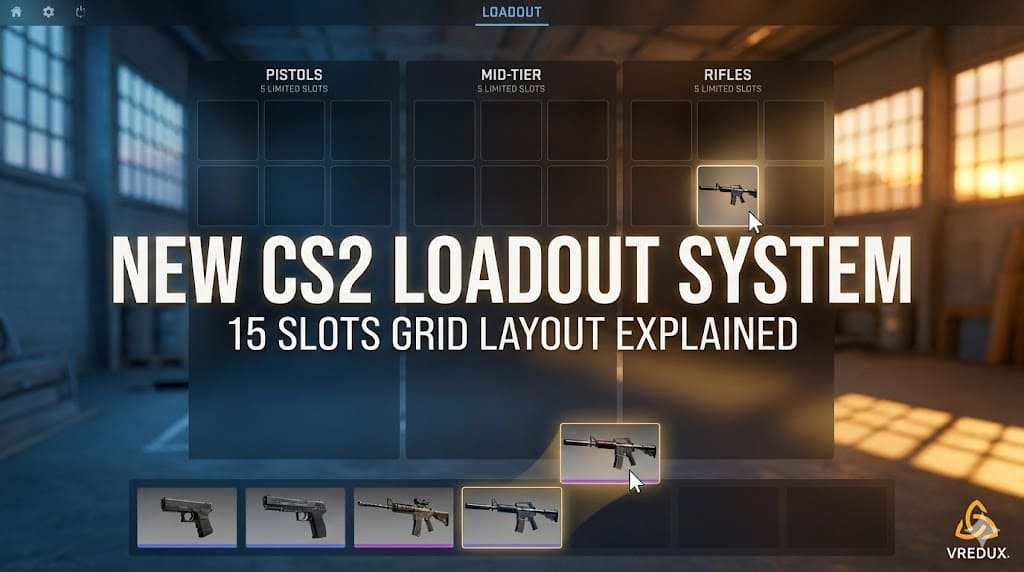
In CSGO, we had that massive wheel where you could theoretically access almost everything. In CS2, Valve decided to streamline things. Now, you have a grid system.
You get exactly 15 slots for your weapons:
- 5 Pistols
- 5 Mid-Tier (SMGs, Shotguns, Machine Guns)
- 5 Rifles
This means you have to make tough choices. You can’t bring both the M4A4 and the M4A1-S into the match anymore unless you sacrifice another rifle slot. You have to select your tools wisely before you click "Play".
How to Change Loadout in CS2?
If you are still trying to figure out how to change loadout CS2, don’t worry, it’s not just you. The UI is cleaner, but it hides things a bit. Here is the step-by-step to change loadout CS2:
- Launch the game and go to the main menu.
- Click on the "Loadout" tab at the top of the screen.
- You will see three columns: Pistols, Mid-Tier, and Rifles.
- To replace a weapon, drag the gun from your inventory list on the bottom to the slot you want to fill in the grid.
- Check your sides: Make sure you configure both the T-side and CT-side. You toggle the side at the top.
That’s it. It’s a simple drag-and-drop system. The key is to load the weapons you actually use. Don't waste a slot on a Negev if you never buy it.
Pro Tip: I always keep a P250 in my starting pistol slot for eco rounds. It’s the best budget backup.
Creating Themed Loadouts in Counter-Strike 2
This is where the fun begins. Themed loadouts are what separate the casuals from the collectors. Building a themed loadout makes your inventory look consistent and clean.
.jpg)
White Themed Loadout (The Cleanest Look)
Everyone wants white skins. They look incredible with the new Source 2 lighting. If you want a white themed loadout, you are usually looking at the "Printstream" or "Asiimov" collections, but those are pricey.
For a budget friendly white setup:
- Pistol: P250 | Whiteout (Minimal Wear)
- Rifle: M4A1-S | Mecha Industries
- AWP: Worm God (has white elements)
Green Loadout (Toxic Vibes)
A green loadout is perfect for players who love to rush.
- Glock-18: Nuclear Garden
- MAC-10: Nuclear Garden
- AWP: Atheris (Green snake, looks sick)
- AK-47: Green Laminate
You can browse CS2 markets for hours finding the perfect shade of green.
Loadout Guide – Budget to Expensive
You don't need to be a millionaire to have a nice inventory. Here is a breakdown of a loadout guide – budget vs. high-tier.
| Weapon Slot | Best Cheap (Under $10) | Best CS2 High-Tier ($100+) |
|---|---|---|
| Pistol | Glock-18 | High Beam |
| Rifle (T) | AK-47 | Slate |
| Rifle (CT) | M4A4 | Magnesium |
| Sniper | AWP | Mortis |
| Knife | Navaja Knife | Urban Masked |
Starting From The Cheap Budget
If you are just starting, focusing on best budget skins is smart. The AK-47 Slate is arguably the best "bang for your buck" skin in the game. It’s all black, super clean, and perfect for sticker craft.
You can find these on the Steam Community Market or third-party sites. Speaking of which, if you want to trade CS2 items, always double-check the prices. Skin trading can be profitable if you are smart.
.jpg)
Best CS2 Loadouts for Competitive Play
When we talk about CS2 loadouts, it's not just about skins; it's about utility.
Counter-Strike 2 players often ask: "What weapons should I bring?"
Here is my recommended competitive meta loadout:
- Pistols: Glock/USP-S, P250, Deagle (Desert Eagle), Tec-9/Five-SeveN.
- Mid-Tier: MAC-10, MP9, XM1014 (auto-shotgun is OP).
- Rifles: AK-47, M4A1-S, AWP, Scout, Galil/Famas.
This covers every economy situation. You have your eco guns, your force-buy options, and your full buy power.
Where to Find and Sell CS2 Skins?
You have a few options to get these items.
- Steam Market: Safe, fast, but high fees.
- Trade CS2 Sites: Lower fees, good for skin trading.
- In-game Drops: You get a weekly care package where you can select a skin or case.
If you want to sell CS2 skins to upgrade your knife, avoid the Steam Community market if you want real cash, as Steam funds are locked to the platform.
Honest take: Valve made the skins look 10x better in CS2. The lighting on the knife doppler finishes is insane.
Improving Your Experience with VRedux
Look, we all want the dream loadout. We all want the Dragon Lore and the Karambit. But spending $5,000 on pixels isn't for everyone.
This is where VRedux changes the game. Our software includes a Skin Changer. You can literally equip any CS2 skin you want, locally.
- Want to see a White themed loadout? Click and apply.
- Want to test a sticker craft before buying? Do it in the menu.
- You can have the ultimate CS2 inventory without spending a dime.
Plus, VRedux helps you find the best settings for optimization and gameplay. It’s not just about looking good; it’s about playing good.
.jpg)
FAQ
How to change loadout CSGO style in CS2?
You can't go back to the wheel. You must use the new grid system in the "Loadout" menu. However, the drag-and-drop mechanic is actually faster once you get used to it.
What is the best cheap loadout in CS2?
Focus on the "Slate" family for rifles and "Clear Polymer" or "Urban DDPAT" for other guns. You can build a full loadout for your inventory for under $20.
Can I have different loadouts for T and CT?
Yes. You switch the side at the top of the loadout screen. You can have a red theme for T-side and a blue theme for CT-side.
Where can I browse CS2 skins?
You can use the Steam Market, CS2 inspect servers, or third-party wikis to see skins like the ones mentioned here.
How to change loadout in CS2 quickly during a match?
You cannot change your loadout grid during a competitive match. You must set it in the main menu before you queue. During the match, you can only buy what you put in your loadout.
Conclusion
Building your CS2 skin collection is a journey. Whether you go for a guide – budget to expensive progression or just use the VRedux skin changer to enjoy the visuals immediately, the most important thing is that you like what you see on your screen.
Don't forget to organize your loadouts before you strike. A well-planned inventory ensures you always have the right weapon for the job.
Ready to upgrade your game? Check out our other guides:
Or visit our main page at VRedux to unlock the full potential of your Counter-Strike 2 experience.