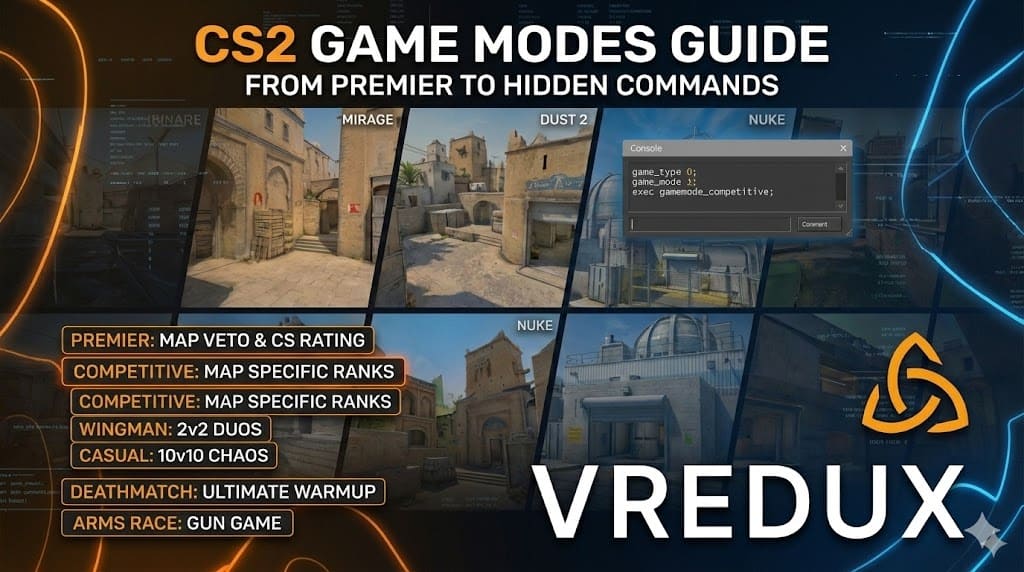
Honestly, when Counter-Strike 2 first launched, it felt a bit empty. We all remember logging in and asking, "Where is Arms Race? Where is Danger Zone?" It was a bit of a shock compared to the content-packed Global Offensive. But Valve has been steadily updating the game, and the current state of CS2 game modes is finally looking solid.
Whether you are a veteran aiming for the global leaderboard or a complete beginner trying to figure out how to plant a bomb, understanding these modes is crucial. In this guide, I’ll break down every game mode available, explain the difference between Premier and Competitive (yes, there is a huge difference), and even show you how to change gamemode CS2 settings via console if you run your own server.
Let’s dive in.
Article Contents:
.jpg)
Premier Mode: The New Competitive Standard
If you want the true esports experience, this is it. Premier is the flagship CS2 game mode. It’s not just about winning 13 rounds anymore; it’s about the CS Rating.
Unlike the old rank system, Premier uses a map veto system. Two teams take turns banning maps until one is left. This forces you to be versatile. You can’t just be a "Mirage global" anymore.
- Format: MR12 (Max 12 rounds per half). First to 13 wins.
- Rating: Numerical (e.g., 15,000 Elo) instead of badges.
- Overtime: Yes, if the score hits 12-12.
My take: This is where the sweat happens. If you want to climb the ladder and see your name on the leaderboard, this is the mode to play. But be warned, without a full stack or some help (like the private VRedux cheat for assists), climbing past 20k can be brutal.
.jpg)
Competitive Mode: The Classic Ladder
Wait, isn't Competitive the same as Premier? Not in Counter-Strike 2.
In CS2, Competitive mode works differently. Now, you have a specific rank for each map. You could be a Global Elite on Dust 2 but a Silver on Nuke.
- Map Selection: You pick exactly which map you want to play.
- Ranks: Classic badges (Silver to Global).
- Vibe: Slightly more relaxed than Premier.
I find this game mode perfect for mastering specific maps. If you suck at Vertigo, just queue Vertigo in Competitive until you learn the angles without tanking your main Premier rating.
.jpg)
Wingman: Perfect for Duos
Sometimes you don't have time for a full match, or you just have one friend online. Wingman is a 2v2 mode played on smaller versions of maps with only one bombsite.
- Format: First to 9 rounds.
- Duration: ~15-20 minutes.
- Dynamics: Fast-paced, high pressure.
It’s great for practicing clutch situations. Since there are only two of you, every kill and every death counts massively.
Casual Mode: Chaos and Fun
If you are new to CS2, start here. Casual is 10v10. It’s chaotic, loud, and the economy is simplified.
- Armor: You spawn with it (don't buy it!).
- Economy: You get more money every round.
- Teams: You can spectate both sides after dying.
This game mode is strictly for fun or learning the basic layout of a map. Don't expect tactical masterclasses here; it's mostly people rushing mid.
Deathmatch: The Ultimate Warmup
Before I jump into Premier, I always spend 10 minutes in Deathmatch. It’s a Free-For-All (or team-based) mode where you respawn instantly.
- Goal: Get the highest score in 10 minutes.
- Weapon: Buy whatever you want (bonus points for specific weapons).
- Utility: None. Just raw aim.
There is no better way to train your crosshair placement and reaction time.
.jpg)
Arms Race: The Fan Favorite Returns
After a long wait, the Arms Race (Gun Game) is back.
- The Rules: You start with a basic weapon. Every 2 kills, you get a new gun.
- The End: The final level is the Golden Knife. You must stab an enemy to win the match.
It’s fast, instant respawn, and incredibly fun. It’s also the best way to test how to change gamemode CS2 settings if you are hosting a LAN party, as everyone loves a quick Gun Game tournament.
.jpg)
How to Change Game Mode in CS2 (Console Commands)
This is where many server admins get stuck. If you are hosting a private server or practice lobby, you need to know the CS2 change game mode command list. The old menus aren't always enough.
To use these, you must enable the developer console (~ key).
Basic Command Structure
In CS2, modes are defined by game_type and game_mode.
| Mode Name | Command Sequence (Type / Mode) |
|---|---|
| Competitive | game_type 0; game_mode 1 |
| Premier | game_type 0; game_mode 0 |
| Wingman | game_type 0; game_mode 2 |
| Casual | game_type 0; game_mode 0 |
| Deathmatch | game_type 1; game_mode 2 |
| Arms Race | game_type 1; game_mode 0 |
Step-by-Step Guide
-
Open Console: Press ~.
-
Select Map & Mode: It is often easier to load the map with the mode directly.
- Example: To play Deathmatch on Mirage, type:
map de_mirage deathmatch
- Example: To play Deathmatch on Mirage, type:
-
Change Mid-Game: If you are already in a map, use the CS2 change gamemode commands:
game_type 0; game_mode 1; exec gamemode_competitive; mp_restartgame 1
Pro Tip: If the settings look weird (like wrong round times) after changing modes, always run the exec command (e.g.,
exec gamemode_casual) to reset the server variables.
Comparison of All CS2 Game Modes
Here is a quick breakdown to help you decide what to play tonight.
| Feature | Premier | Competitive | Wingman | Casual | Deathmatch |
|---|---|---|---|---|---|
| Players | 5v5 | 5v5 | 2v2 | 10v10 | All vs All |
| Ranking | CS Rating | Skill Group | Skill Group | None | None |
| Map Pick | Veto | You Choose | You Choose | Vote | Vote |
| Armor | Buy | Buy | Buy | Free | Free |
| Collision | Yes | Yes | Yes | No | Yes |
| Friendly Fire | Yes | Yes | No | No | No |
FAQ: Common Questions About CS2 Modes
How to change deathmatch mode in CS2 to Free For All?
By default, Deathmatch in CS2 is Free-For-All (everyone is an enemy). If you want team deathmatch, you usually need a custom server configuration, as the standard valve deathmatch is FFA.
Is there a hidden Battle Royale mode?
Currently, Danger Zone (Battle Royale) is not active in Counter-Strike 2. Files for it have been found by dataminers, so we expect Valve to add it in a future update.
My CS2 gamemode command isn't working?
Make sure you have admin rights (sv_cheats 1 usually helps for local tests). Also, ensure you type both game_type and game_mode followed by mp_restartgame 1.
Can I play 5v5 with friends against bots?
Yes. Select "Practice" from the main menu. You can pick "Competitive" or "Casual" there. This is effectively a private matchmaking session against AI.
What is the best mode for XP?
Deathmatch gives consistent XP based on score, but Competitive matches give a larger chunk if you win rounds. For weekly drops, just play whatever you enjoy most.
Conclusion
Counter-Strike 2 offers a variety of ways to play, from the intense grind of Premier to the mindless fun of Arms Race. Each game mode serves a purpose: training, competing, or just relaxing.
If you are struggling to rank up in Premier or feel like your aim is lagging behind in Deathmatch, it might not just be your skill. Optimizing your game is key. Check out our guides on how to fix high ping in CS2 to ensure your connection isn't holding you back.
And if you want to dominate every match with superior knowledge and mechanics, consider looking into the VRedux software. It’s designed to give you that edge in every round.
For more tips on configuring your game, read our breakdown of useful console commands to fully customize your HUD and controls.
Go pick your mode, lock in, and good luck on the servers!